Summary of what happened:
Hello all,
I have a set of multiecho resting state data that was collected on a Philips Achieva 3T machine that I am trying to convert to NIFTI. However, I am getting lots of errors about slice positions and missing images when I pass the whole folder of raw dicoms to dcm2niix, and when the conversion completes, the header info on the generated images is incorrect.
All other images from the same session (T1/T2, DWI, single-echo fMRI, multiecho fieldmaps) convert as expected, so I know the data transfer was not the issue.
We did two runs of a 5-echo resting state sequence with ~300 volumes and 24-25 slices per volume at a TR of 1.355 (apologies, I don’t have the exact specifications on hand). Any recommendations for sorting out what is going wrong here would be greatly appreciated!
-JD
Command used (and if a helper script was used, a link to the helper script or the command generated):
I used both the command-line version of dcm2niix as well as the version hosted within MRIcron with this command. However, the command line version returns a “No valid DICOM images were found” error.
dcm2niix -f "%f_%p_%t_%s"-p y -z y "c:\DicomDir"
Version:
dcm2niix -v
v1.0.20260416
Environment (Docker, Singularity / Apptainer, custom installation):
Ubuntu-26.04 via WSL2
Relevant log outputs (up to 20 lines):
From the CLI, I receive this error:
Warning: Unsupported transfer syntax '1.2.840.10008.1.2.4.90' (see www.nitrc.org/plugins/mwiki/index.php/dcm2nii:MainPage)
No valid DICOM images were found
I know that that error has to do with a JPEG2000 compression issue, but I was under the impression that the version of dcm2niix that I am using could handle that decompression method.
From the MRIcron interface, I receive these warnings.
C:\Users\20265703\MRIcron\Resources\dcm2niix.exe -f "%f_%p_%t_%s" -p y -z y "D:\tmseeg_test4_20261012_151310518"
Chris Rorden's dcm2niiX version v1.0.20190902  (JP2:OpenJPEG) (JP-LS:CharLS) MSC1900 (64-bit Windows)
Found 8259 DICOM file(s)
Image Decompression is new: please validate conversions
Slices not stacked: echo varies (TE 88.498, 63.504; echo 4, 3). Use 'merge 2D slices' option to force stacking
Slice positions repeated, but number of slices (1687) not divisible by number of repeats (40): missing images?
Hint: expected 42 locationsWarning: Interslice distance varies in this volume (incompatible with NIfTI format).
Warning: Missing images? Expected 1687 images, but instance number (0020,0013) ranges from 7634 to 24564
Using RWVSlope:RWVIntercept = 0.954335:0
 Philips Scaling Values RS:RI:SS = 0.954335:0:0.0210596 (see PMC3998685)
Convert 1687 DICOM as D:\tmseeg_test4_20261012_151310518\tmseeg_test4_20261012_151310518_rsfMRI_5TE_7min_20261012113714_1301_e4 (96x96x1687x1)
Unable to equalize slice distances: slice order not consistently ascending.
 Recompiling with '-DmyInstanceNumberOrderIsNotSpatial' might help.
Slice positions repeated, but number of slices (1704) not divisible by number of repeats (40): missing images?
Hint: expected 42 locationsWarning: Interslice distance varies in this volume (incompatible with NIfTI format).
Warning: Missing images? Expected 1704 images, but instance number (0020,0013) ranges from 7648 to 24568
Using RWVSlope:RWVIntercept = 0.954335:0
 Philips Scaling Values RS:RI:SS = 0.954335:0:0.0210596 (see PMC3998685)
Convert 1704 DICOM as D:\tmseeg_test4_20261012_151310518\tmseeg_test4_20261012_151310518_rsfMRI_5TE_7min_20261012113714_1301_e3 (96x96x1704x1)
Unable to equalize slice distances: slice order not consistently ascending.
 Recompiling with '-DmyInstanceNumberOrderIsNotSpatial' might help.
Slice positions repeated, but number of slices (1675) not divisible by number of repeats (39): missing images?
Hint: expected 42 locationsWarning: Interslice distance varies in this volume (incompatible with NIfTI format).
Warning: Missing images? Expected 1675 images, but instance number (0020,0013) ranges from 7635 to 24565
Using RWVSlope:RWVIntercept = 0.954335:0
 Philips Scaling Values RS:RI:SS = 0.954335:0:0.0210596 (see PMC3998685)
Convert 1675 DICOM as D:\tmseeg_test4_20261012_151310518\tmseeg_test4_20261012_151310518_rsfMRI_5TE_7min_20261012113714_1301_e5 (96x96x1675x1)
Unable to equalize slice distances: slice order not consistently ascending.
 Recompiling with '-DmyInstanceNumberOrderIsNotSpatial' might help.
Slice positions repeated, but number of slices (1635) not divisible by number of repeats (38): missing images?
Hint: expected 42 locationsWarning: Interslice distance varies in this volume (incompatible with NIfTI format).
Warning: Missing images? Expected 1635 images, but instance number (0020,0013) ranges from 7642 to 24577
Using RWVSlope:RWVIntercept = 0.954335:0
 Philips Scaling Values RS:RI:SS = 0.954335:0:0.0210596 (see PMC3998685)
Convert 1635 DICOM as D:\tmseeg_test4_20261012_151310518\tmseeg_test4_20261012_151310518_rsfMRI_5TE_7min_20261012113714_1301_e2 (96x96x1635x1)
Unable to equalize slice distances: slice order not consistently ascending.
 Recompiling with '-DmyInstanceNumberOrderIsNotSpatial' might help.
Slice positions repeated, but number of slices (1558) not divisible by number of repeats (37): missing images?
Hint: expected 42 locationsWarning: Interslice distance varies in this volume (incompatible with NIfTI format).
Warning: Missing images? Expected 1558 images, but instance number (0020,0013) ranges from 7641 to 24551
Using RWVSlope:RWVIntercept = 0.954335:0
 Philips Scaling Values RS:RI:SS = 0.954335:0:0.0210596 (see PMC3998685)
Convert 1558 DICOM as D:\tmseeg_test4_20261012_151310518\tmseeg_test4_20261012_151310518_rsfMRI_5TE_7min_20261012113714_1301_e1 (96x96x1558x1)
Unable to equalize slice distances: slice order not consistently ascending.
 Recompiling with '-DmyInstanceNumberOrderIsNotSpatial' might help.
Screenshots / relevant information:
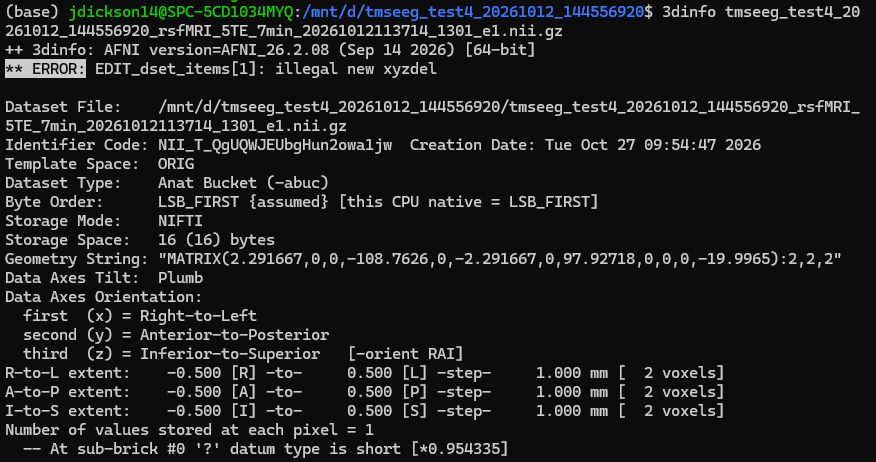
Using AFNI 3dinfo, these are the metadata errors I see. I’m expecting an image with 300ish volumes and 24ish slices (don’t have the exact acquisition information available at the moment)