Dcm2niix - TR Metadata Lost after Siemens XA Upgrade

Summary of what happened:

Hi all,

My center recently upgraded our Siemens Prisma from E11 to XA60, and since then I am having a new problem with dcm2niix that I haven’t encountered before.
dcm2niix is now failing to correctly interpret the slice timing and TR metadata from the raw DICOM images from the scanner. Our images are reaped from the scanner directly to Flywheel and converted to nifti/json via the Flywheel dcm2niix gear.

I am trying to process some of the data we have acquired since the upgrade, and got a crash warning from fmriprep that the TR could not be interpreted. Upon checking further, the unprocessed niftis show a TR of 1s. I know for certain that our BOLD acquisitions use a 2s TR. I decided to download a folder of raw short data to check the header info and then convert it myself, and this is where I found the discrepancy. The DICOM header confirms that the acquisition had a TR of 2000ms, but after converting, the NIFTI claims a TR of 1.

This error does not occur on the images collected prior to the XA upgrade even though the acquisitions are identical. We are using a modified CMRR BOLD acquisition with TR/TE=2000ms/30ms,
Two of the three sequences are gated by PyschoPy to induce a 400ms delay between acquisitions, but our resting state image does not have this delay but is still throwing the TR/slice timing error.

Any suggestions on how to fix this? Because Flywheel is responsible for the image pull, I cannot confirm whether the dicoms were exported in classic or enhanced format and I have not had the chance to try and manually export them to a flash drive to inspect.

Command used (and if a helper script was used, a link to the helper script or the command generated):

dcm2niix -z y 1.3.12.2.1107.5.2.43.66044.2026030314463753976660598.0.0.0.dicom

Version:

Chris Rorden’s dcm2niiX version v1.0.20250505

Environment (Docker, Singularity / Apptainer, custom installation):

LPC Computing Cluster (RHEL9)

Relevant log outputs (up to 20 lines):

Warning: 4D Siemens XA images should be exported as enhanced not classic DICOM. Slice times and other properties may be inaccurate.
Warning: Slice timing appears corrupted (range 2400..4317.5, TR=0 ms)

Screenshots / relevant information:

I used AFNI’s dicom_hdr function on the raw DICOM image to verify that the acquisition metadata reflects the 2s TR.

And then checked the TR of the converted nifti image using 3dinfo and found that it had defaulted to 1.

The TR field is also completely missing from the JSON file output by dcm2niix.

Any assistance or suggestions are greatly appreciated, and I am happy to provide any further information to help diagnose and solve this issue.

Thanks!

JD


Hi Jess,

The issue, I think, based on the warning you posted, could be related to the fact that the image acquisition is gated. In that case, the volume-to-volume interval will be varying, so I don’t know what “dcm2niix” would set the NIfTI TR to. Could you verify that you also get the same warning about the slice timing for the resting state acquisition? (If you do, then my theory would be incorrect).

Regarding the enhance Vs. classic DICOMs: Flywheel’s connector send whatever images the scanner outputs to your Flywheel instance. If the scanner produces enhanced DICOMs, they will be pushed to Flywheel. But I guess you need to configure the scanner to produce enhanced DICOMs for this.

If you want, you can open a support ticket with Flywheel and we’ll be happy to look into it.

Best,

-Pablo

Hi Pablo,

My first guess was also that something was being corrupted by the gating even though it hasn’t been an issue up to this point (>300 prior acquisitions).
I tried the same process as above with a resting state acquisition that is not gated at all, and had the same luck. Same XA warning, same slice timing error:

I was able to go to the scanner and manually pull the images today in the two different available formats - interoperability and enhanced.
The images exported in the interoperability format retained the TR metadata that is lost in the Flywheel export. The resting state images seem to be properly encoded and decoded. However, the gated images have a new field in the .json sidecar file:
image
Our “true” TR for the gated acquisition is 2.4s between the start of each volume, but the scanner is only collecting 2s worth of slices per volume with a 400ms gap. This is a new concern with how the data will be interpreted by subsequent processing steps, but not the primary issue for this thread.

As for the enhanced format images, I can’t even get dcm2niix to run on them.
image
And the decompression methods are failing as well, so I am kind of at a standstill with this, and I’m still unsure in which format the images are being pushed to Flywheel.

Any thoughts? I will talk to our local Flywheel admin about putting in a ticket.

Thanks!
Jess

Hi Jess,

This acquisition that you were able to pull the images in both formats, was it also automatically pulled into Flywheel? If so, when you run the “dcm2niix” gear, did it give you the same error as when you manually ran “dcm2niix” on the data?

For the “enhanced” manually-exported images, could you please upload them to Flywheel via UI? (Go to the corresponding menu, click on the three-dots and select “Imports”). The “dcm2niix” gear comes with “gdcmconv”, so it should be able to handle those images (you might need to use the “decompress_dicoms” option).

Finally, about putting in a ticket, you can do it yourself: in the UI, click on the question mark next to your avatar, and select “Support”.

-Pablo

Hi Pablo,

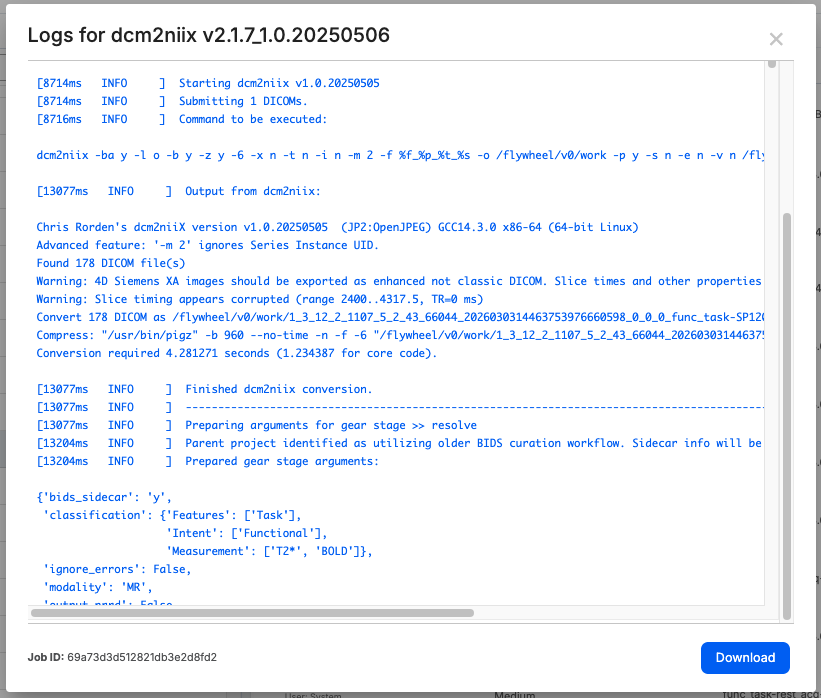
You are correct, the images were automatically pulled into Flywheel from the scanner, and the dcm2niix gear is set to run automatically. Looking at the logs, the conversion was successful, but displays the same warning that I was getting from the CLI version about corrupted slice timing and incorrect TR:

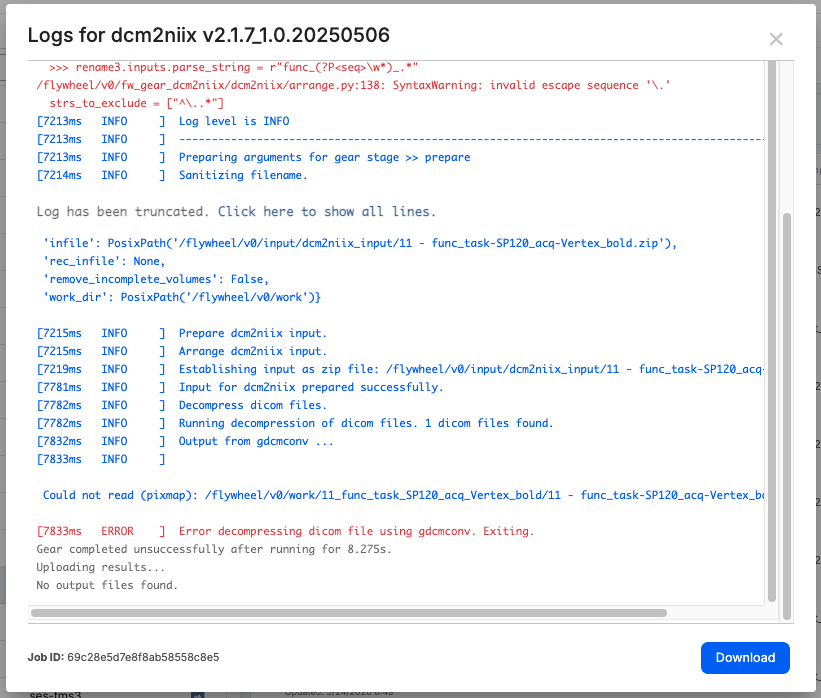
As for the enhanced images, I uploaded them to Flywheel, but the dcm2niix gear is failing to decompress with gdcmconv. If I don’t toggle the “decompress_dicoms” flag, it gives me the same compression warnings as in the CL version, but when I have that setting enabled, it exits with an error:

Any other thoughts? I will put a ticket in with Flywheel to see if they have any thoughts about why that option within the gear failed. Would it be worth also putting in a support ticket on the dcm2niix GitHub?

I also tried using the --ignore_trigger_times flag on the interoperability formatted images to try and force it to interpret the TR as 2 rather than the inter-trigger time of 2.40105, but it that also did not give me what I’m after.

Thanks,

Jess